.svg)


Website Maintenance Checklist: Weekly to Annual Tasks (2026)
Launching a website is only the start. Once it goes live, plugins need updates, links break, content goes out of date, and small technical issues start to pile up. Without regular checks, these problems tend to show up at the worst possible time, like in the middle of a campaign or right after a Google update.
This website maintenance checklist covers what to do every week, month, quarter, and year to keep your site secure, fast, and ranking. You can follow it yourself or use it to check what your developer or agency is actually doing.
What is website maintenance?
Website maintenance is the regular process of checking, updating, and fixing your website so it stays secure, loads quickly, shows accurate information, and keeps ranking in search. It includes software updates, backups, security scans, speed checks, content updates, SEO monitoring, and accessibility testing.
A typical maintenance routine covers:
- Security updates for your CMS, plugins, and themes
- Backups and restore tests
- Speed and uptime monitoring
- Broken link and error checks
- Content and business information updates
- SEO and analytics reviews
- Accessibility and cross-device testing
Why is website maintenance important?
There are three main reasons to stay on top of maintenance:
- Security. Outdated plugins, themes, and CMS versions are one of the most common ways websites get hacked. Regular updates close those gaps.
- SEO. Slow pages, broken links, and crawl errors make it harder for search engines to crawl and rank your site.
- Leads and sales. A broken form or checkout won't always show an error message. You just stop getting inquiries or orders, and it can take weeks to notice.
Outdated content also hurts trust. If a visitor sees last year's prices or a team member who left months ago, they start to wonder what else on the site is wrong.
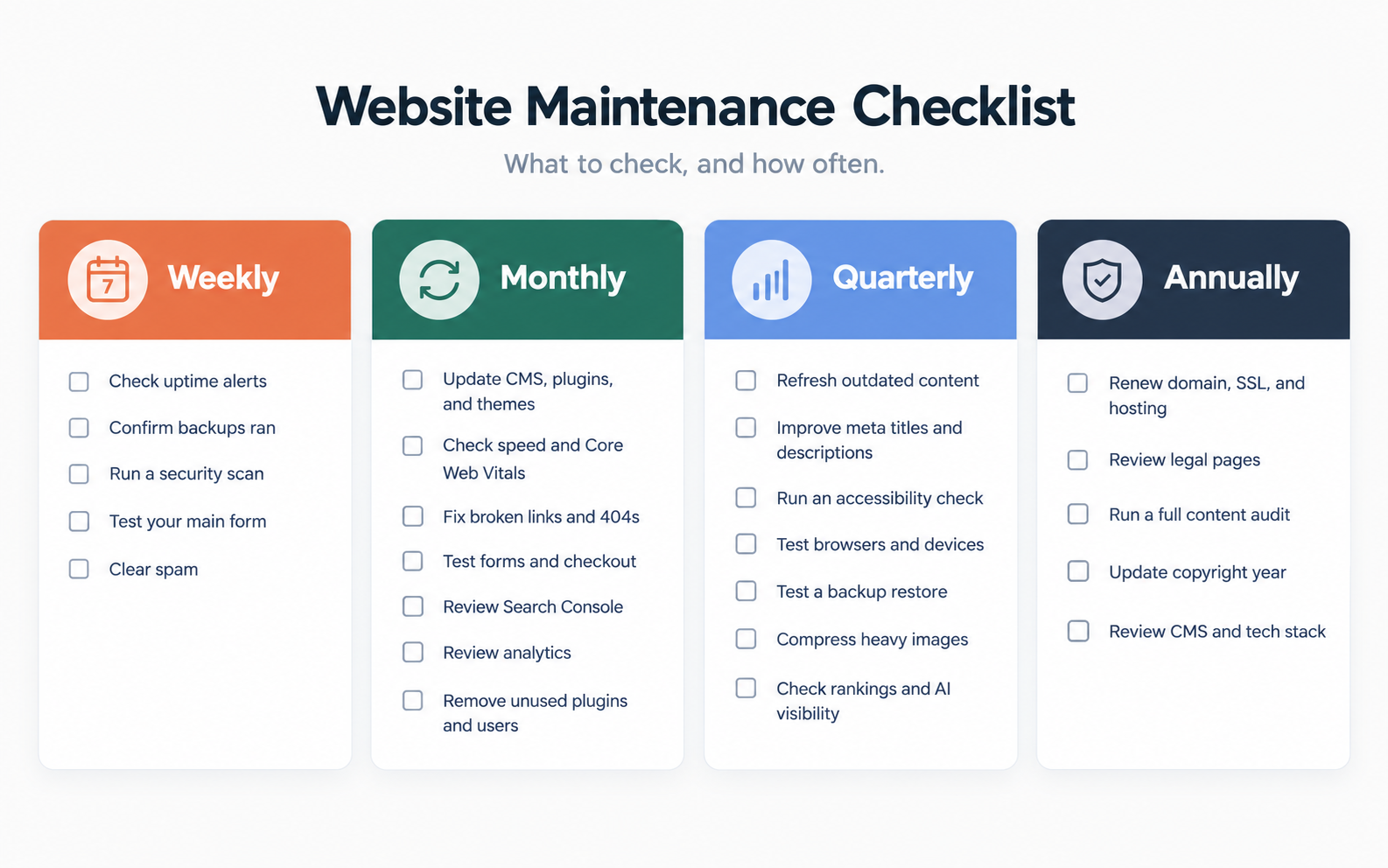
Website maintenance checklist at a glance
Use this table as your master schedule. The sections below explain each task in more detail.
Weekly website maintenance checklist
These are quick checks. Most of them can be automated, so you only need to look at the alerts and reports.
- Check your uptime monitor for any downtime
- Confirm your latest backup finished and is stored off-site
- Run a malware and security scan
- Submit your main contact or quote form to make sure it works
- Delete spam comments and form submissions
Monthly website maintenance checklist
Set aside a few hours on the same day each month for these tasks.
1. Update your CMS, plugins, and themes
Updates fix security issues and keep everything working together. They can also break things, so test them before they reach your live site.
What to do:
- Back up the site before you update anything
- Apply updates on a staging site first if you have one
- Check your homepage, forms, and key pages after updating
- Read the changelog before installing a major version update
2. Check site speed and Core Web Vitals
Slow pages lose visitors and rankings, and speed tends to get worse over time as you add content and features.
What to do:
- Test your homepage and top landing pages in Google PageSpeed Insights
- Review the Core Web Vitals report in Google Search Console
- Aim for an LCP of 2.5 seconds or less, an INP of 200 milliseconds or less, and a CLS of 0.1 or less
- Look for oversized images, unused scripts, and heavy plugins
If your WordPress site keeps getting slower even with regular updates, the cause is often one of these common WordPress speed issues.
3. Find and fix broken links
Broken links frustrate visitors and send search engines to dead ends.
What to do:
- Crawl the site with Screaming Frog or Ahrefs Site Audit
- Update internal links that point to moved or deleted pages
- Set up 301 redirects for removed pages that still get traffic or backlinks
- Replace or remove dead external links
4. Test your forms and checkout
Forms and checkouts can stop working after an update without anyone noticing.
What to do:
- Submit every contact, quote, and newsletter form
- Confirm the notification email and the CRM entry both come through
- On ecommerce sites, place a test order on desktop and mobile, including one with a discount code
5. Review Google Search Console
Search Console often shows a problem before it affects your traffic.
What to do:
- Check the Pages report for new indexing errors
- Look at the Security issues and Manual actions reports
- Compare clicks and impressions with the previous month
6. Review Google Analytics
What to do:
- Compare traffic and conversions with last month and the same month last year
- Note any pages that lost a lot of traffic
- Make sure your conversion events are still firing
7. Clean up plugins, themes, and users
Deactivated plugins can still be a security risk, so remove anything you don't use.
What to do:
- Delete unused plugins and themes
- Remove accounts for former employees and contractors
- Check that each user has only the access they need
Quarterly website maintenance checklist
Every three months, look beyond quick fixes and review how the site is performing.
1. Update outdated content
- Check pricing, services, team bios, hours, and contact details
- Refresh blog posts that still get traffic but have old stats, screenshots, or dates
2. Improve meta titles and descriptions
- In Search Console, find pages with lots of impressions but a low click-through rate
- Rewrite their titles and descriptions so they better match what people are searching for
3. Check accessibility
Use WCAG 2.2 as your standard.
- Scan your key pages with WAVE or axe DevTools
- Try navigating the site using only your keyboard
- Check color contrast and make sure images have useful alt text
Automated tools don't catch every issue, so the manual check is worth the extra few minutes.
4. Test on different browsers and devices
- Check your main pages in Chrome, Safari, Firefox, and Edge
- Test on at least one iPhone and one Android phone
5. Test a backup restore
Having backups doesn't help if they don't work. Restore a recent backup to a staging site and make sure everything loads correctly.
6. Optimize images and media
- Find the largest image and video files on the site
- Compress them and switch to WebP or AVIF where your platform supports it
7. Review rankings and AI search visibility
- Check rankings for your most important keywords
- See whether your brand shows up in Google AI Overviews and AI assistants for questions your customers ask
- Add pages that are losing positions to your content refresh list
Annual website maintenance checklist
Once a year, look at the bigger picture and take care of renewals.
- Renew your domain, SSL certificate, and hosting - Turn on auto-renew and make sure the payment method on file is current. An expired domain or SSL certificate can take your site offline or show visitors a security warning.
- Review your legal pages - Update your privacy policy, terms of service, and cookie policy so they reflect the tools you use now and any privacy rules that apply to your business.
- Do a full content audit - Go through every page and decide whether to keep it, update it, merge it with another page, or remove it. A proper content audit also helps you find thin or overlapping pages that compete with each other in search.
- Update the copyright year and site-wide details - Check the footer and other global sections for an old copyright year, outdated social links, and promotions that have ended.
- Review your CMS and tech stack - Ask whether your platform, hosting, and integrations still work for your team. If you decide to switch, plan the website migration carefully so you don't lose the rankings you've built.
Website maintenance by platform
How much maintenance you need to do depends a lot on the platform your site runs on.
WordPress
You're responsible for almost everything: core updates, plugins, themes, hosting, security, and backups. Plugins are the biggest risk, so keep the number low and test updates before applying them. Managed WordPress hosting can take care of backups and server updates for you.
Webflow
Webflow handles hosting, SSL, and platform updates, and there are no plugins to update. Your maintenance focuses on CMS content, third-party scripts and integrations, forms, and Editor access for your team.
Shopify
Shopify manages hosting, platform security, and checkout. You still need to review your installed apps (unused ones can slow your store down), keep your theme updated, test checkout and discount codes, and keep product, shipping, and policy pages accurate.
Website maintenance tools
These tools cover most of the checklist above.
When maintenance isn't enough
Sometimes the problem is the website itself. If updates keep breaking things, your team struggles with the CMS, pages still fail Core Web Vitals after optimization, or the design no longer fits your brand, these are common signs you need a website redesign. At that point, rebuilding can make more sense than continuing to patch an outdated site.
Final thoughts
Regular maintenance keeps your website secure, fast, and accurate, and it's usually far less work than fixing problems after they cause damage. Start with the monthly checklist, automate the weekly checks, and add the quarterly and annual tasks to your calendar. If your site needs more than maintenance can fix, Striped Horse can help you plan a redesign that's easier to keep up to date.