.svg)


Website Content Audit: What It Is and How To Do It

Most websites have more content than anyone on the team realizes, and less of it actually working than anyone wants to admit. Pages that nobody visits. Blog posts ranking for nothing. Service pages with outdated messaging that went live three years ago and hasn't been touched since. A content audit surfaces all of it.
It is one of the most useful things you can do for your website, and one of the most consistently skipped. This guide explains what a content audit is, how to know when you need one, and how to run one from start to finish.
What is a website content audit?
A website content audit is a structured review of every piece of content on your site. It looks at what you have, how it's performing, whether it's accurate, and whether it's actually serving your audience and your business goals.
A full audit typically covers:
- Performance - which pages get traffic, which get none, which rank in search
- SEO - metadata, keyword targeting, internal linking, indexability
- Quality - accuracy, readability, brand alignment, depth
- Gaps - what your audience is looking for that you haven't covered
It's worth separating this from a technical SEO audit, which focuses on the infrastructure of your site: crawl errors, page speed, Core Web Vitals, redirect chains. A content audit looks at what's on your pages, not how the pages are built. In practice, the two often happen together, but they answer different questions.
Signs your website needs a content audit
You don't need a formal trigger to run a content audit. But these are the situations where one becomes genuinely urgent.
Traffic or rankings are dropping with no clear technical cause. If your organic search performance is declining and nothing obvious has changed on the technical side, the problem is often content. Thin pages, outdated posts, and keyword cannibalization between similar articles are among the most common culprits.
You're planning a website redesign or site relaunch. A content audit should happen before any redesign, not after. Migrating bad content to a new site just gives you a better-looking version of the same problem. Knowing what to keep, what to update, and what to cut before the build starts saves significant time and budget.
Your brand or messaging has shifted. If your positioning has evolved but your content hasn't caught up, visitors are reading things that no longer reflect who you are. This is more common than most teams realize, especially after a rebrand or a pivot in target audience.
Content keeps getting published but nothing is reviewed or retired. Publishing without auditing is how websites end up with hundreds of pages, a handful of which drive almost all the traffic. If your team is focused entirely on creating new content, a backlog of underperforming pages is almost certainly building up behind them.
You have no clear picture of what's actually on your site. If the honest answer to "what's on our website?" is "not sure," that's the audit telling you it needs to happen.
The two types of website content audits
There are two approaches to a content audit, and the right one depends on what you're trying to accomplish. Most full audits combine both.
Content inventory and quantitative analysis
A content inventory is the foundation of the audit: a complete list of the URLs and content currently on your site. Quantitative analysis adds performance data - traffic, search visibility, engagement, conversions, and backlinks - to show how those pages are actually performing.
This is the right starting point when you need a clear picture of scale, when you're preparing for a migration, or when you're new to a site and trying to understand what you've inherited. It's the lowest-effort approach and gives you the most immediate clarity.
Qualitative audit
A qualitative audit goes a layer deeper. It evaluates the content itself: is it accurate? Does it reflect the current brand voice? Does it serve a real audience need? Is it well-structured and easy to read? Does it have a clear purpose and a clear next step for the visitor?
This type of audit takes more time and requires human judgment. It's harder to scale with a spreadsheet and a crawler. But it's the version that actually tells you whether your content is good, not just whether it exists and gets traffic. Run a qualitative audit when you're preparing for a redesign, refreshing your content strategy, or trying to understand why high-traffic pages aren't converting.
How to do a website content audit, step by step
Step 1: Define the goal and scope of your audit
Before collecting URLs, decide what you want the audit to accomplish. You might be preparing for a website redesign, investigating an organic traffic decline, cleaning up outdated content, improving conversions, or identifying gaps in your content strategy. If you're heading into a redesign, reviewing your website design requirements before the audit helps set the right scope. The goal shapes every decision that follows.
Then define the scope. A content audit can cover the entire website or focus on a specific section such as the blog, service pages, product content, or resources. Clear goals and scope determine which data you need and how each page should be evaluated.
Step 2: Crawl your site and build your inventory
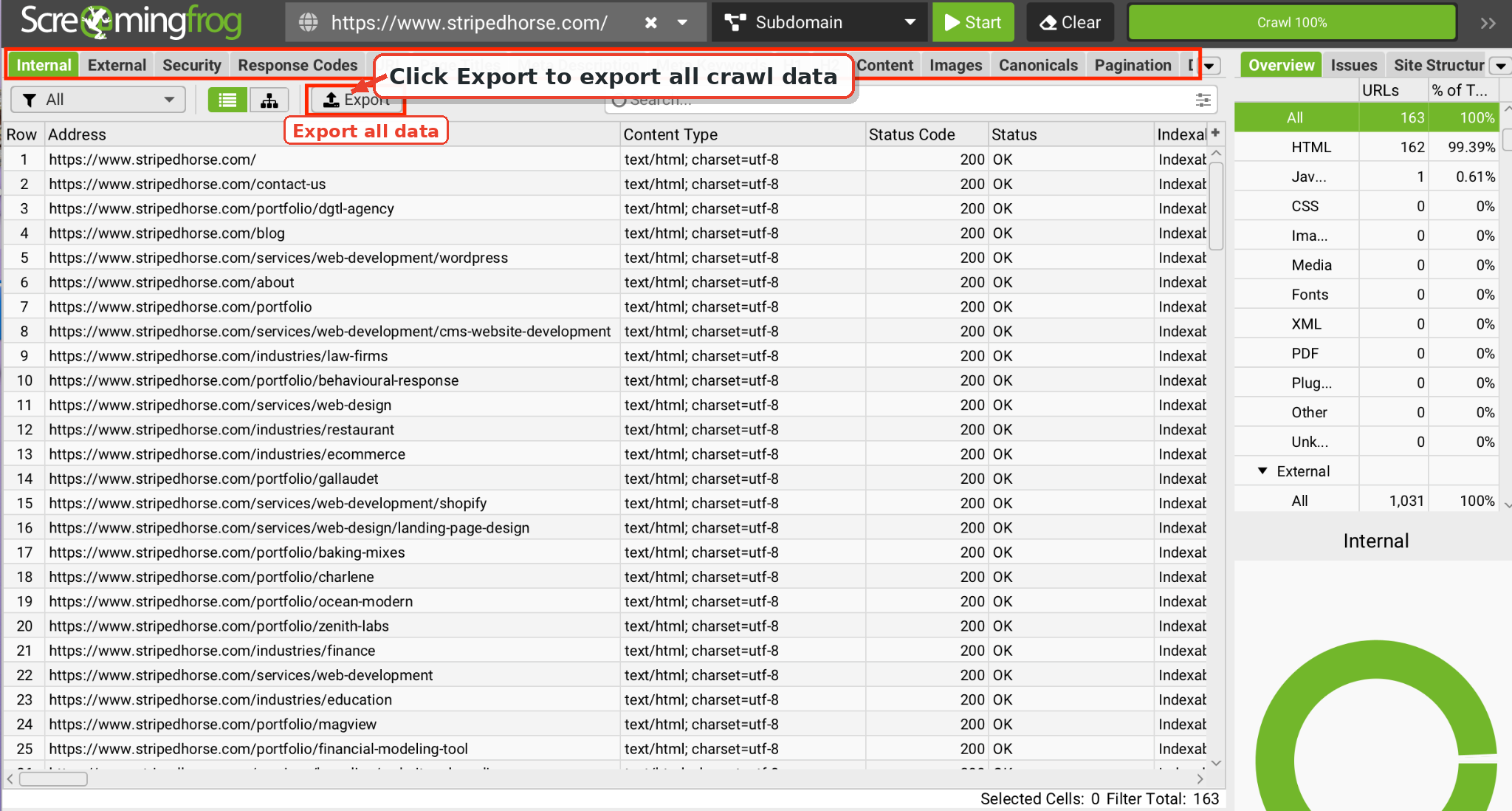
Start with a complete list of every URL. Use Screaming Frog to crawl your site and export all discovered pages. If you have a sitemap, cross-reference it. The crawler will often surface pages that aren't in the sitemap and shouldn't be - old campaign pages, duplicate URLs, orphan pages with no internal links pointing to them.
Your crawl export is the foundation of your audit spreadsheet. Every URL goes in.
Step 3: Pull performance data from GA4 and Search Console
Once you have your URL list, layer in the numbers. From Google Analytics 4, pull sessions, average engagement time, bounce rate, and conversion data for each page over the past 12 months. From Google Search Console, pull impressions, clicks, average position, and the queries each page is ranking for.
This data tells you which pages are doing real work and which are invisible - and, when combined with your website traffic sources, gives you a fuller picture of how visitors are actually finding your site. A page with strong impressions but low clicks may have a weak title tag or meta description. A page with traffic but no engagement might have a content quality problem. A page with zero impressions for 12 months is a candidate for consolidation or removal.
Step 4: Build your master spreadsheet
Combine everything into one document. A thorough audit spreadsheet should include:
- URL
- Page title
- Page type (blog post, service page, landing page, etc.)
- Primary purpose
- Target keyword
- Search intent
- Sessions (last 12 months)
- Impressions and clicks from Search Console
- Average position
- Conversions or key events
- Backlinks
- Internal links pointing to the page
- Last updated date
- Word count
- Content quality rating
- Cannibalization or overlap notes
- Recommended action
- Priority
You can pull much of this automatically from your crawl export and analytics tools. Fields like content quality, overlap notes, and recommended action get filled in as you work through the evaluation.
Step 5: Decide what to do with each page
With your data in front of you, assign each page one of six actions:
- Keep - accurate, useful, and performing its intended role
- Update - still valuable, but outdated, incomplete, or underperforming
- Consolidate - overlaps significantly with another page that serves the same intent; merge them into one stronger page
- Redirect - no longer needs to exist independently but has a clear, relevant replacement; set a 301 to that page
- Remove - serves no useful purpose and has no appropriate replacement
- Create - the audit has revealed an important content gap the site doesn't currently cover
Separating redirect from remove matters. Not every page that needs to come down has a logical destination, and redirecting to an unrelated page creates its own problems.
Step 6: Check your SEO fundamentals
For every page you're keeping or updating, run through the basics:
- Is the page indexed? Check coverage in Search Console.
- Does it have a unique title tag and meta description?
- Is the H1 clear and keyword-aligned?
- Are there internal links to and from this page?
- Are there any broken links on the page?
- Is the URL clean and descriptive?
These are not glamorous, but they are consistently where rankings are lost. Missing metadata and orphan pages are among the most common issues a content audit uncovers. If mobile performance is a concern, run through a mobile SEO checklist alongside your audit.
Step 7: Assess content quality
This is the qualitative layer. For the pages you plan to keep or update, read them. Ask:
- Is the information still accurate?
- Does the tone reflect your current brand voice?
- Is it easy to scan? Does it use clear headings, short paragraphs, and relevant visuals?
- Does it answer the question the visitor is likely arriving with?
- Does it demonstrate expertise and build trust?
- Is there a clear next step - a CTA, a related page, a contact prompt?
Content that passes the performance filter but fails the quality filter should go on your update list. High traffic to a weak page is an opportunity, not a result.
Step 8: Review content for search and AI visibility
Search visibility now extends beyond traditional organic results to AI-generated search experiences and answer engines. As part of the audit, review whether important pages explain key concepts clearly, answer relevant questions directly, use descriptive headings, and provide information that is easy for both users and search systems to understand.
This should not mean rewriting every paragraph for AI. The priority remains useful, accurate content written for the intended audience. Clear structure and direct answers simply make that information easier to discover and interpret across different search experiences.
Step 9: Identify content gaps
Your audit will show you what you have. A gap analysis shows you what's missing. Cross-reference your page inventory against the questions your target audience is actually searching for. Look at:
- Which topics appear in Search Console as queries with impressions but no strong ranking page
- Which competitor topics your site doesn't cover
- Which stages of the buyer journey have strong content and which have almost none
Gaps become your next content calendar. Pages that already exist but underperform become your update queue. This is how a content audit feeds your forward strategy, not just your cleanup effort.
Step 10: Build your action plan
Your audit is only useful if it results in action. Prioritize by impact: start with pages that have the most traffic potential and the most obvious issues. A page ranking in position 8 for a high-volume keyword is often a faster starting point than creating something new from scratch.
Assign owners, set deadlines, and track progress in the same spreadsheet you built the audit in. The output of a good content audit isn't a report - it's a prioritized to-do list.
Tools you'll need for a content audit
- Screaming Frog - full site crawl, metadata export, internal link analysis
- Google Analytics 4 - traffic, engagement, and conversion data by page
- Google Search Console - impressions, clicks, rankings, indexation status
- Ahrefs or Semrush - keyword rankings, backlink data, traffic estimates
- Google Sheets - your master audit document; everything lives here
You don't need all of these to run a useful audit. Search Console and a spreadsheet will get you further than most teams manage. The tools add depth, not the audit itself.
What to do after your content audit
Running the audit is the first half. Acting on it is where the work actually happens.
Update high-potential, underperforming pages first. Pages already ranking around positions 5 to 15 for relevant queries can be strong optimization opportunities because Google already associates them with the topic. Review search intent, content quality, internal links, click-through rate, competing pages, and SERP changes before deciding what to update.
Redirect or consolidate thin and duplicate content. Two pages covering the same topic split your authority and confuse search engines about which one to rank. Merge the best of both into a single stronger page and redirect the weaker URL to it.
Remove dead weight carefully. Pages with no traffic, rankings, backlinks, or strategic purpose may be candidates for removal, but check whether they have a relevant replacement first. If a closely related page exists, use a 301 redirect. If there is no meaningful equivalent, allowing the removed URL to return a 404 or 410 can be more appropriate than redirecting users to an unrelated page.
Feed your findings into your content calendar. The gaps you identified are now your next topics. The pages you flagged for updates are now your editorial priorities. A content audit done well makes your entire content operation more intentional and harder to second-guess.
Make audits a habit, not a project. The most effective content teams don't treat audits as a once-every-few-years undertaking. They run rolling audits by section, set annual reviews for core pages, and monitor performance monthly. The longer you wait between audits, the larger and more expensive the cleanup becomes.
Conclusion
A content audit is not a glamorous project. It involves spreadsheets, difficult decisions about content you spent real time creating, and honest assessments of what isn't working. But it's the clearest way to understand where your website actually stands and what it will take to improve it.
If you're planning a website redesign or trying to build a stronger content strategy and want a team that handles both, Striped Horse works with brands across industries to make sure their websites are built on content that performs. Take a look at our digital marketing services or get in touch to talk through where you want to take your site.